That’s one of those weird Moorhead-isms. 24 hours in a car with your family will do that to you. After the Adventures of Huckleberry Finn audiotapes grew stale and we started commenting on roadside advertisements, embellishments quickly arose and road delirium took its toll.
Anyway, my sister bought me a Raspberry Pi a couple years ago. At the time, I think she intended it to be a low cost computer introduction for my daughter. But by the time the kid was old enough to understand basic computer inputs, she had a tablet, so the Pi sat unused. Then I made a dashboard, similar to my recent Xbox project, but this quickly fell into disuse as the Pi would timeout and I’d have to hunt down a keyboard and mouse to refresh the browser again (I discussed this recently). Then I simply plugged it into the network as a Linux experimentation device to self-teach the command line interface. Sudo apt-get upgrade! cd /etc/…uhhhh ls… sudo nano /boot/config.txt… You get the idea. I figured if I really screwed something up, it was a low-risk device I could wipe clean.
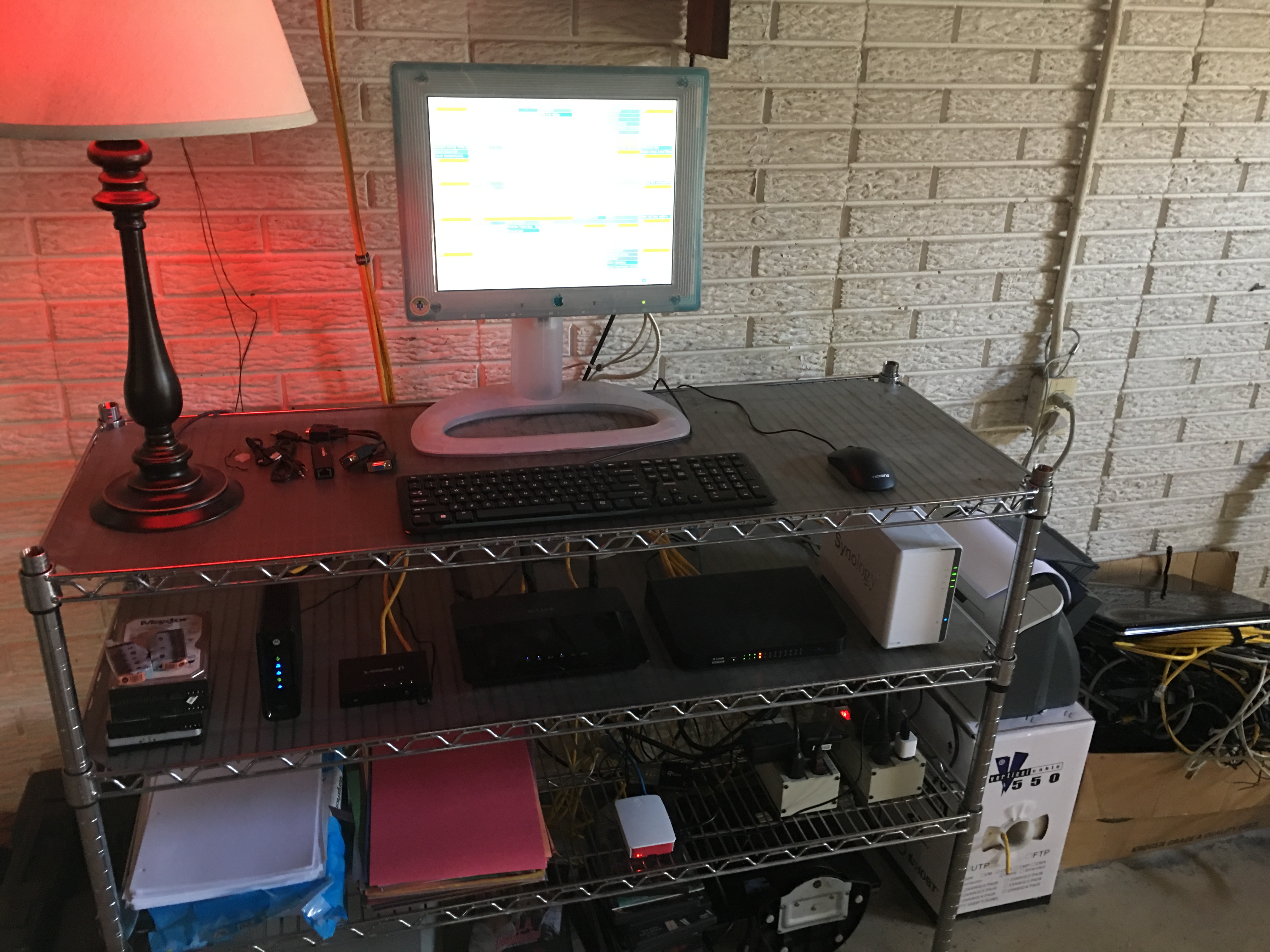
The old laptop had been reassigned. Sitting in the basement on the shelf with the network equipment, devoid of battery and working WiFi card, it served as a simple OS to run a web browser. With an external monitor, it ran two windows–my Google calendar, and my weather radar. Then Windows’ on-board SMART monitor detected an imminent hard drive failure. I repeatedly ignored the warning, since I didn’t really care about its longevity and all its data had since been backed up. Then one day the computer installed updates and failed to find the drive upon reboot. Maybe one day I’ll swap the drive and install a Linux distro.
But I missed the omnipresent calendar, so I decided it was time to revive the Pi and once again give it purpose. After all, all I needed was a basic machine that could run a browser (and Windows had been overkill, and a big security hole). So I ordered a cheap keyboard and mouse from Amazon, which I received 2 days later (I love Prime’s free 2-day shipping). I also needed an HDMI to VGA adapter, which Amazon was happy to provide as well. I hooked up that 18-year old Apple LCD display (which retailed for $1,999 at the time; https://en.wikipedia.org/wiki/Apple_Studio_Display#15-inch_flat_panel_.281998.E2.80.932003.29,https://manuals.info.apple.com/MANUALS/0/MA473/en_US/StudioDisplay_15inchLCDSetup.PDF) plugged in the peripherals, and…everything worked instantly, because it isn’t Windows.
After some quick updating, I had the calendar up and running in kiosk mode. All things considered, this was pretty benign, and was almost too easy to feel like a bona fide project. Still, it got me the hour nerd fix I needed.
For the majority of my adult life, I’ve had a preference for D-Link network products. In the early days, before security was a primary concern, the simple ability of a router to even perform NAT routing reliably was a major accomplishment. The old Apple Airport base station that dad had purchased was okay, but was notoriously flaky and required software to administer (rather than the universal browser-based GUI). We had developed a ritualized order in which devices on the network had to be unplugged and rebooted in order to restore connectivity.
Network equipment from 1999–40-bit WEP encryption, awwww yeah!
When I moved into my first college apartment, a friend at the time gave me a D-Link router, the ol’ DIR-524. It did it’s job admirably, though it became dated and thrown into a box when I moved into my second apartment, replaced by my roommate’s newer model Linksys.
This guy supported 802.11g!
But then the Linksys fried, and I dug out the D-Link again. I continued to use it in two additional apartments thereafter, until I finally forked over $70 for a newer D-Link (although this was after I tried a Netgear, which continually dropped its routing), the DIR-655.
First gigabit-capable hardware I owned
That first D-Link has long-since disappeared, but the 655 still functions on my network to this day, having been reconfigured to operate as a hotspot (300N is still fast enough for an internet connection). My point is that, over the years of router experiences, the only ones that seem to have been built with decent hardware and designed with stable firmware were D-Links. After multiple iterations, I was a brand snob, and currently have 3 of their wireless routers in operation.
But the Internet’s come a long way since the 90s, and while router manufacturers have figured out how to design their equipment to function reliably at a base level, they have not put a premium on security. I suppose that, given the price points of consumer-grade network equipment, the manufacturers have to prioritize, and that priority has fallen upon aesthetic design and marketing rather than support and security. They can’t be blamed for that, since they’re only responding to demand (and the controversial “WAF”). I suppose if customers demanded security, then they would respond accordingly.
My currently-running model: DIR-880L
I’ve listened passively as entire lines of consumer-grade routers were revealed to have massive security holes, and the manufacturers failed to respond. These compromises always affected other brands, but all good things come to an end, and the flaws were gradually revealed throughout D-Link products too. Pity. Now it seems that no brand is immune. All consumer-grade routers have similar problems, and I found myself left without a viable alternative. And while I’m probably unlikely to be targeted, I do have Internet-facing services, like this site (rather that hiding in stealth mode). So, it was time to consider upgrading to a business-class router.
When classifying routers, the target demographic is commonly used in its description. That carries certain connotations, such as the knowledge and motivation of the purchaser, and the level of features and security. Consumer-grade routers are designed to be pretty, work out of the box, and be easily configured if the user wants, but configuration isn’t generally required (or terribly robust). At the other extreme are Enterprise-class routers, which assume a support staff of certified technicians (and an enterprise-level budget, being in the tens of thousands of dollars). Everywhere in between lie Business-class routers, which I find to have the largest range in price and user-friendliness.
I was primarily after something basic–something that maintained firmware updates with vulnerability discoveries, that had good policy-driven default security settings, and still something that I could figure out given my lack of expertise. I decided upon a Ubiquiti Edgerouter X. It operates on their EdgeOS (which is the same across their entire line of products, which means it’s going to get updates as they respond to the needs of their bigger clients), and has received a number of positive recommendations from people in the industry. And at $50, the price was good and low-risk.
Aesthetics be damned (but I still think it’s a cute little box)
It bears mentioning that this is no all-in-one wireless router–not a problem since I have hotspots configured, but be advised.
Amusingly, I lacked a general computer with an Ethernet port. I know that seems odd, but computers are increasingly scaled down to reduce form factor and to extend battery life. And since I haven’t yet built an office, I don’t have a place for a full desktop yet, and therefore stick to laptops. In short, I needed an adapter.
After some searching, I found an Amazon brand adapter:
The reviews checked out, so I ordered that too. I did anticipate some problems getting drivers, since the included CD-ROM was useless as I also lacked a CD drive, but they were available online and after a quick install, things were working as advertised. I needed one of these anyway for other wired LAN configurations, so this project was just the final excuse.
In every consumer-grade router setup I’ve ever experienced, I plug in the router, connect via Ethernet to LAN port 1, navigate to http(s)://192.168.0.1, and am immediately presented with the configuration page login. I followed these same steps, and…nothing. Just an unfriendly browser timeout. I repeated these steps, wondering what I had done wrong. It was not a good sign that I failed at even finding the configuration page. This was not going to be easy.
The instructions assumed a certain degree of competence, of which I apparently did not posses. Fortunately, a kind soul elsewhere on the Internet had written a dummy’s guide for these initial steps (although later, I found these same steps on a quick setup pamphlet in the box, so that was my fault). I had left my computer’s network settings to pull an IP address via DHCP, as is the norm, but the Edgerouter doesn’t come with DHCP enabled by default. Instead, I had to manually assign an IP address to my computer within the normal range of the router’s subnet, which was 192.168.1.0/24 (excluding 192.168.1.0 and 192.168.1.1), so I chose 192.168.1.11 (anything in that range would presumably have worked, but I decided to follow the advice explicitly). 192.168.1.1 was therefore the default address for the router (and different than standard consumer grade routers). I accessed this IP address and was presented with the login. Success!
Already it looks more professional
The default login credentials were, however, in the manual; so at least I was able to log in right away.
Then, I was presented with the main screen:
The screenshot isn’t mine, but it’s more or less what I saw
Uhhhh, what do I do? I spent the next half hour clicking everything to figure out where all the settings were. Router GUIs are always somewhat random, but this one definitely allowed more customization than I was used to. Fortunately, I found a wizard. I generally avoid these, but I had two reasons for using them this time: 1) I wanted to keep the existing configurations on my D-Link, and it’s segmented guest WiFi, so that meant either massively overhauling the setup and possibly buying more equipment, or double NAT-ing; and 2) I didn’t fully understand what I was doing and wanted some more hand-holding. I ran the WAN-LAN setup wizard.
I followed the prompts, the router rebooted, then nothing worked again. Fortunately, I did know enough to switch the Ethernet cable to from eth0, where I had it and which was now configured to be the WAN port, to eth1. Then I re-enabled DHCP on my computer. Success! I logged in.
I connected the modem to eth0, but the router never pulled an IP address from the ISP. Frustrated, I repeated the above steps to no avail. Then I went and fetched the most recent firmware for the device, which was many versions out of date. Ultimately, this wasn’t the problem, but I’m glad it forced me to go pull the security updates before completing all my configurations.
Turns out I just had to reboot the modem. I know I know, what a noob mistake. I put the blame on the new hardware when in fact it’s probably the most advanced piece of network equipment I now owned. I followed the wizard again, slightly changing the defaults so that eth1 and eth2 were separate subnets–a future experiment in network isolation. It’s novel, and seemingly obvious now, that each port on a router be configurable.
So, the modem ran into eth0 (now the WAN), eth2 to the WAN on the old router. Then I had to input all my port-forwarding settings so I could reach the server, and check a setting for NAT reflection, and input my DNS settings, bla bla bla. In short, everything was back online…except for logging into my email server for some reason. I’ll have to figure that out later.
[Edit: I figured out that I needed to add a firewall rule on the server to allow logins from the Edgerouter’s IP address]
The important thing is that it works, and my consumer-grade router is no longer the Internet-facing entry point to my LAN. Presumably, I have a business-class firewall protecting me now.
And an interesting little extra is the DPI feature, screenshot example (again, not my own):
Of course, since I’m double NAT-ing, I don’t see the breakdown per client, but I do see an aggregate of all the network traffic. I don’t know how robust this is, but it sure looks cool.
Liz might call be paranoid, but it’s only paranoia if aluminum foil wasn’t demonstrably effective at blocking alien mind-reading rays (at least business-class foil anyway).
You can’t have my email address and I don’t want your junk.
There’s my grumpy old man cry, but it’s not without merit. Too often, when I sign up for a service, I’m required to provide my email address. Often, this is for practical reasons, but just as often, the site just doesn’t have a justifiable need-to-know. They just want to send junk and promotions.
But rather than disconnect myself, I needed a solution. To address this very problem, people often create a separate email account for these types of websites, knowing that it’ll become overwhelmed with junk, whilst leaving their primary email a sacred haven for more important correspondence. Failing to find an alternative to the mandatory email-divulging requirements (because these sites always require that you confirm it’s a valid email by clicking a link sent to it), I, too, finally relented and adopted this solution. But I’m a techie, so I’m not simply going to Gmail for this. No, I’m not creating a run-of-the-mill dummy email, I’m creating an alter ego! A doppelgänger! An…Arbiter of Techno-Ethereal Ontology!
Okay, that might be a little cumbersome to adopt as a username, but as this mystical stand-in must remain a spectral whisper, I shan’t divulge its true name, because…you know…then you’d be immune to its powers. Some LeGuin shit right there.
And because I don’t want to divulge its true name, I couldn’t use it as the email user name, so instead, I will use my server’s email platform to create…an alias! That’s right, an alias to my doppelgänger–additional layers of mystery. I shall become a shadow of the Internet. WHOIS ain’t got shit on me!
Okay, “subscriptions” is a rather anticlimactic alias considering the pretentious melodrama from earlier, but I needed it simple to remember and type.
And so, I created the doppelgänger user account on the server, then by leveraging the server’s mail software, I designated the aforementioned alias. Now I can simply use the server’s Roundcube-based webmail client and sign into the doppelgänger account as needed (no push notifications!). I sent a test email from my primary account to subscriptions@moorheadfamily.net and…
Success! So why bother with this more difficult solution that essentially does the same thing as a free mail service? Well, there’s the reason that I can, but also that I can then enable and disable the email address at will, without losing the inbox, so if I start getting too much junk mail in the dummy account, I’ll disable the alias and make a new one, which will cause all future junk mail to bounce, and I won’t have to change my login to the main doppelgänger account–just set up a new alias and forward that to the doppelgänger instead.
Why can’t all just play nice on the Internet to begin with?
Well, initially I was just involved with another one of my web design projects. I had previously built a dashboard of sorts–a web page that had embedded widgets. I would open the page with my Raspberry Pi, and plug it into the TV. Then I could just switch inputs and see the displayed info–weather and news–on my main TV.
The problem with this method is that I could never figure out a way to automatically open the browser upon boot and enter kiosk mode. Usually this wasn’t a problem, but whenever the Pi got unplugged, I had to hunt down a mouse and keyboard so I could relaunch the browser. The Pi’s browser also had a habit of timing out, so I’d have to refresh it manually, which again meant hunting down a mouse/keyboard. Eventually, the novelty of the project wore off and the irritations outweighed the benefit, so I moved the Pi to the basement where it sits idle–serving only the purpose of being a low-risk device with which to practice remote shell Linux commands from the command line terminal.
Then I realized that since the Xbox has a native browser, perhaps I could revive the dashboard project to simply run on the Xbox. I dug up the URL from where I had buried it, and launched the site.
The news feed wasn’t working, and the embedded calendar was redundant as I had a setup already running that in the basement. So the dash would need a redesign after all.
I settled on 3 panes: my embedded NOAA radar, a weather forecast widget, and a news feed. The first 2 I already had working, and some CSS got them positioned right. But for the life of me, I could not find a reliable news feed that allowed iframe embedding. The former method I had been using was a free Google service, which they had since deprecated. Everyone wants you to sign up for things now. Apparently something as minor as general news is no longer considered a free service. Pity. After failing to find a replacement, I abandoned the news feed idea.
I needed something else to fill the space, and I concluded that I would just complete the weather theme and find a free webcam. I began with local news stations, but as with their Doppler radars and news feeds, nothing was intuitive, embeddable, or truly free. Does everything have to be a source of revenue? There was a time when the Internet was considered a free medium.
Further searches revealed a local webcam. It was good resolution, too, and a genuine live-feed (something that rarely exists anymore). Plus, the hosting server didn’t have any lockouts on iframe embedding. Some more CSS and I had the webcam feed on my dashboard.
It could have ended there, but I grew curious. Who would host a publicly-available webcam? I began poking around the hosting domain.
The website’s design was pretty basic by modern standards–no HTML5, no adaptive content, no CSS styling. It was a refreshing throwback to the Internet of the 90s. The site itself was a resource on radio: HAM, scanners, AM PSA; and where to learn about them and buy equipment. I tuned in to 1660 AM–the listed station, and heard a local broadcast of a High School sports event.
Further intrigued by this grass-roots site, I did a WHOIS search on the domain, and found to my surprise that the site’s registrant’s information wasn’t blocked. The address of his office was public, and as it turned out, just a mile north of my house. The webcam couldn’t have been much more local than that.
Something about the site inspired me. Maybe it was guilt at having access to free information and a webcam, or a desire to give back. Maybe I just wanted to see if I could help someone, or simply needed an excuse for another project. Who knows? Whatever the reason, I spent a couple evenings coding a new front page for the site. I modernized it and organized the information so it was easier to navigate. I assigned this redesign it’s own subdomain and hosted it on my server. Then, I sent the owner an email.
I told him I liked the information on the site and the webcam, and offered the redesign code freely were he interested. I told him that it was nice to see such a site, obviously self-hosted, and offering a public service.
The email was a Yahoo! domain, and as I was a random stranger reaching out from the internet, I didn’t expect to receive any response. But to my surprise, hours later, he answered.
He explained in great detail the site’s content–the public radio station for citizens to make announcements and what he uses to transmit local high school games. He confirmed the webcam is for public use, and that the local Channel 2 news uses it sometimes in their weather reports. He explained that his maintenance of the business he’s mostly retired from, but keeps it running for extra revenue for his hobbies. Consequently, he wasn’t interested in help with the web design, but he thanked me for offering.
I confess, I had always found HAM hobbyists to be weirdos, but this man was surprisingly normal, giving off a vibe of being an older man with hobbies that overlapped a personal business. We should all be so lucky.
I thanked him for the information and told him this was an interesting experience as a segue into another world of communications technology for me. It reminded me that while a technology inevitably becomes commercialized, and the large companies garner the most attention, niche groups and hobbyists remain, using the technology for its original purpose, free from the capitalistic motivations of shareholders. It remains as evidence that intellectuals still pursue knowledge for knowledge’s sake, and offer free benefits to the population as a whole in the process.