I run a VPN server at home. This is for 2 reasons: to remotely access local services, and as a security measure to encrypt my phone’s traffic. These reasons are what I feel to be the primary purpose of VPNs. This is also what allows me to work at home with a company computer.
However, a consequence of this tunneling is that, from the perspective of any server to which the computer connects, that computer appears “physically” to be at the VPN’s emergence point. This result, what I consider to be a mere auxiliary function, has caused VPN services to experience a surge in popularity for the sole reason of bypassing geolocation restrictions. I snub my nose at those who subscribe to services for this reason, as I envision Millennials, deluded with a sense of feeling smarter than everyone else, bypassing “The Man” in order to access streaming content–with no appreciation for the actual security benefits that VPNs provide.
Then the 2018 Olympics arrived and I found myself unwilling to endure yet another year of NBC’s coverage. Between their endless commentary and commercial breaks every 5 minutes, they’ve done everything in their power to make these events unwatchable. And they succeeded, at least for me. So I did exactly what I just expressed my condescension against, and shopped for VPN providers.
I stumbled across a site that actually explained the history of VPNs and their technology, a refreshing divergence from the usual array of clickbait-y sites (a la Gizmodo):
Given the comprehensiveness of the supplied information, I took their opinions to be acceptably educated, and subscribed to a month’s service from their top recommendation, www.expressvpn.com.
When the Olympics arrived, I connected to a server in Toronto and loaded the CBC’s live stream. And behold!:
The CBC is mercifully low on commercials and commentary; and they stream live, rather than delaying for time zones. I’d launch into some self-righteous rhetoric about runaway capitalism interfering with something who’s inherent purpose is contrary to this value, but I’m content to just go watch some more events and stop blogging.
Because, really, when’s the last time anyone in the US got to watch curling?
To me, the printer is a medium. I use that word in a way that people who believe it’s possible to communicate with ghosts do. The printer in a means by which we can connect the material to the metaphysical. Information which only exists in digital form–a specific pattern of magnetized bits–can be made tangible via the printer. And despite everyone claiming that they want to live in a paperless world, the preference for paper media over digital for varying personal and/or practical reasons renders the printer a critical component to our collection of electronic devices.
So surely a device of such importance would be built well, with a reliable OS and hardware, built by trustworthy vendors.
Yet for anyone who’s ever used one of these machines, we know this to not be the case. Apart from the general user-end experience, when it seems invariably impossible to print something when it’s absolutely critical that that document be printed, printers are plagued by a number of more nefarious problems. Offhand, I can think of a few that have popped up over the years: proprietary ink cartridges embedded with chips to prevent the use of 3rd-party replacements, chipped cartridges coded with expiration dates that prevent their use after a specified date regardless the level of remaining ink, printers which cache all print jobs in non-volatile and unencrypted drives, printers with closed-source software containing obsolete encryption libraries…and so on. In short–printers are evil devices used only out of necessity, and this necessity is exploited by manufacturers.
Now for my personal story.
I needed a printer (see above). My laundry list included separate color ink cartridges and network operability, and after reading reviews I decided upon the Canon MP640.
Ultimately the scanner got more use than printing, amusing in that it more often converted analog media to digital than the other way around.
The device came with two NICs–ethernet and wireless, and from day one I had trouble with the ethernet. The wireless worked okay, but I’d rather of used the ethernet for the usual list of reasons. But the ethernet NIC was IP-sticky, seemingly ignoring NAT assignments and demanding that it be given .1–which was a problem because .1 was the router’s IP. So the wireless was used instead, but years later I wanted to explore the wired again. I disabled wireless and plugged in the ethernet. Then, for whatever reason, I became distracted with other things and never got around to fighting the printer.
Then, a few days ago, I noticed the main network switch downstairs furiously blinking. Every connected port’s corresponding status light was flashing simultaneously…as was the living room’s, and the center room’s. That didn’t seem right, obviously.
But the switches are unmanaged and data wasn’t passing through the edgerouter which does DPI, so I couldn’t readily deduce the problem. Still, everything had connectivity, so I let the problem go. But there was an obvious lag, so I had to figure it out.
So in the dark hours of the night, which is when I do this sort of work, I began my super-technical investigation by systematically unplugging cables until the flashy lights stopped. As this is a residential network, it didn’t take long to narrow down: the guest room cable. This jack is connected to an older router, which is acting as a non-NAT access point. Wireless devices jump on and off as they roam, but I had also plugged the printer into it. Recalling my past troubles, I unplugged it and the network instantly fell back into its normal patterns.
I’ve debated getting a new printer, but then I considered the work Xeroxes–multi-thousand dollar machines with regular servicing, and even those won’t cooperate with the network on a regular basis.
I don’t know why these machines won’t play nice. Maybe one day, when my consciousness has been entirely converted into a digital signature, I’ll no longer have need for a printer. For now, I suppose I’ll just have to grin and bear it.
It’s a bit of a mixed blessing, but it can be a tad irritating when a company decides what’s best for me without my consultation. To some extent, we opt in, either through conscious choice or implied by purchases; and in so doing, we are putting our trust in the companies we choose. But there’s a fine line and it’s easy to cross.
For example, given the ongoing drama surrounding internet encryption standards and certificates, a certain trend has developed in which browser vendors have leaned towards becoming a tad…snarky with their judgments. For example:
This connection most certainly is secure, to which the browser will even attest upon closer examination:
Large cipher block, perfect forward secrecy, current protocol version, large hash bit size. This is an excellently secure encrypted connection.
However…
Without authentication doth not exist security, irrespective of the level of encryption. And since the certificate for this site is self-signed (due to a lack of practical alternative options–since it’s my edgerouter), the browser cannot effectively authenticate the source of the encrypted connection. Therefore, said encryption is useless if one cannot confirm to whom they are communicating.
Except…
I know the certificate and server are legit, and have accepted the certificate as de facto trusted and indicated such to my browser. Yet the browser has the audacity to assert that the connection is not secure despite this.
It’s a step too far I say! I angrily shake my fist at the monitor and log in anyway. Fuck you!
You might notice a paradox here. And therein lies the source of endless frustration. Plainly stated, you can’t install a security update unless you mess with a working system. So what to do?
Well, my personal plan of attack has been to check the patch notes before installing anything, and judge its relevance to my given application. For example, I put off updating my VPN software because the patched vulnerability was an old version of L2TP/IPsec–something I don’t use.
But the growing list of CVEs on my WordPress install started to concern me, some of which were alarming, like broken access restrictions with URL injection. Yikes. Still, I waited, because I really didn’t want to mess with it.
Then my server automatically updated its PHP packages (I thought I had disabled automatic updates), which brought my blog down. So begrudgingly, I used it as an excuse to finally update. I began the install process.
As it turns out, WordPress runs on PHP 5.6 (the scripting language which loads data from the SQL backend)–at least the package I have installed anyway. Other programs I run require PHP 7, so I have both installed. But the automatic PHP upgrade deactivated 5.6 in favor of 7, which not only broke the site, but prevented the install. I manually reactivated 5.6, which then triggered its own update, requiring me to patiently wait another hour while it completed.
PHP updated, I tried to load the installer again, but found out that the MariaDB (the open-source fork of SQL) version, version 5, had been stopped in favor of version 10–very similar to the PHP problem. So I reactivated version 5 and waited patiently while it updated.
These updates collectively maxed the server’s processing power, which then brought down the entire machine. Nothing’s more nerve-wracking than watching an eternally-spinning icon, devoid of any meaningful information like a status bar. But, patience and a lot of burning stomach acid later, the installs completed and the server came back online.
I started the WordPress install, and was prompted for MariaDB 5’s root password. I looked up my complex and randomly-generated password, pasted it in, and continued. Then I was prompted for MariaDB 10’s root password. Curious, why would it need both? Unfortunately, I have yet to find a solid answer, as the WordPress package installations and their associated communities vary widely across the web.
It’s friendly logo hides its true nature
Then I was prompted for my database user account, which I input as well. The installation clocked for several minutes, then advised that I did not have access to the databases. Curious. I knew with certainty what my user password was. I considered that maybe the root password was different. To find out, I installed a database management interface and attempted to log into both databases as root. All attempts failed. So apparently I didn’t know the root’s password.
A brief web search revealed the default password to be blank, which bothered me immensely. Granted, it probably wasn’t as big a problem as I was thinking, since presumably only the localhost would have access to the database, but that still seems like a bit of a security hole, like say if malware made its way into the machine. Also, the management interface I had installed was Internet-facing, which meant that the moment I installed it, my databases were publicly accessible. Nothing private is in there, but still. Ah well, I used the interface to change the root passwords for both databases and reattempted the update with the correct credentials.
The install crashed and the logs said the update failed. I checked the install package, and its version matched the newest. Confused, I consulted the logs again, but this time it said that the install was successful. Finally some good news. I opened up the site.
The site loaded its front page, but without images. I refreshed the page, only to then find that the only data loading was in the browser’s cache. The page wasn’t there anymore. So I checked the web directory’s contents and was dismayed to see that the entire WordPress folder had been purged of data. The update had reinstalled anew, rather than updating.
I had taken the precautions of backing everything up, so I wasn’t completely distraught, but I began to fear that the WordPress package itself was beyond repair. I had previously considered 3rd party hosting solutions, and figured that this would be my final salvation. But first–I would use my automatic backup service to retrieve the last version from my Amazon Drive account, which was timestamped as that morning around 5AM.
The restore took about a half hour. I reloaded my site, and it worked! I admit I was surprised. I had surmised that the site solely operates through a conglomeration of PHP scripts which access the database, but if that were the case, then the file restore would have wiped out the upgrade–which after checking again, it hadn’t. So it was the package itself that got updated, not necessarily the script files.
I admit, I still have a long way to go to understanding this technology, but that was the original point of starting this blog. For now, I’ll remain content that my site is functioning at all.
I have 3 monitors up currently, running at maximum resolution and with the sizing adjusted to cram as much information as possible onto these screens without feeling eye strain. I casually peruse the internet. Every tech site I visit has followed a similar theme–they’ve used the entire monitor’s real estate for its intended purpose and filled it with information.
Then I visit a blog and there’s large segments of white space and the articles are crammed into tiny columns with large verticality. Now, I do know why, as I’m in the industry and have had experience with web design (I’ve even attended a seminar that touched on this): the human eye is lazy and wants to float through text as comfortably as possible, and varying studies have revealed anywhere from 45-70 characters per line to be the most comfortable. And to this I say quite frankly: bollocks.
I can’t remember the last book I read, aside from a children’s story, which adhered to this philosophy. Oh I know the argument has been that paper reads differently from digital, which has also been the primary argument in the running debate regarding deprecating serif fonts; but how lazy are we really when we want to read something of interest? Personally, I don’t find it all that difficult to adjust to varying font sizes and widths, and my eyes are far from 20/20. I do find it irritating, however, to have to continually scroll down a page as I read.
It was a lingering gripe I had with this default WordPress theme, that it was capping content width at around this 75-character mark, and no obvious means existed by which to adjust it. The whole point of using an authoring program like WordPress was to not have to dig into code to add content and make changes. Adding to that, it’s much more difficult to dig into code that someone else made than it is to modify my own, so this issue is doubly aggravating. Further still, each version of WordPress and each separate theme has different settings, so consulting the usual Internet discussion was fruitless.
No matter, it’s all CSS after all. How hard could it be?
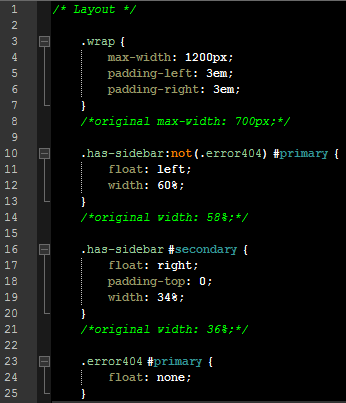
As it turns out, it’s relatively easy to make the change. The difficult part was finding the styling info I needed. But thankfully, WordPress not only has an engine for modifying the stylesheet within WordPress itself, they were kind enough to also have left a comment trail throughout. I found what I was after in a little section called Layout.
Post-modification, additional comments are mine to remember default values
“.wrap” encompasses anything under that umbrella, and after experimentation I found that 1200px made much better use of a full desktop monitor without overloading visual elements. Then I adjusted the percentile ratios of “#primary”, the main content column which contains posts, and “#secondary”, all that sidebar stuff to the right. Above are my changes.
Like all web design, visual layouts are trial and error, and I may tweak things more in the future. But for now, I find the posts’ width to be much more practical. And now my embedded images appear bigger as well.
I’m sure much of this is personal preference, but I really hated wasting all that space. Whether or not anyone else might agree with my assessment, at least this post shows the means by which it can be changed to suit other’s needs.






 As it turns out, WordPress runs on PHP 5.6 (the scripting language which loads data from the SQL backend)–at least the package I have installed anyway. Other programs I run require PHP 7, so I have both installed. But the automatic PHP upgrade deactivated 5.6 in favor of 7, which not only broke the site, but prevented the install. I manually reactivated 5.6, which then triggered its own update, requiring me to patiently wait another hour while it completed.
 PHP updated, I tried to load the installer again, but found out that the MariaDB (the open-source fork of SQL) version, version 5, had been stopped in favor of version 10–very similar to the PHP problem. So I reactivated version 5 and waited patiently while it updated.