DNS

Of all the digital glues holding the Internet together, the domain name system is probably  one of the most critical, yet also the weakest.  The current protocol as a whole is unencrypted, and if it goes down, or is interfered with, then that prevents communication to anything not a hard-coded IP address.  But even then, SSL PKI breaks down unless the certificate in question was specifically exempted.  In short, a DNS failure would break the Internet.

And it was exactly that scenario in which I found myself recently.  I, the security-minded sysadmin of the home, had long since switched my DNS provider over to what at the time I determined to be the most privacy-minded and secure: Quad9.  And I never had any issues since.  But I made an error with my configuration: I specified two Quad9 DNS IPs, rather than using a different party as fallback.  And when, for inexplicable reasons, Quad9’s DNS servers ceased to resolve my DNS queries, I found myself offline–sort of.

Certain devices bypassed DNS, notably my work laptop and the Ring cameras.  Liz’s work laptop did not, however, which is an interesting aside in that mine must have a hard-coded VPN IP and hers did not.

But back to the main story.  I had never experienced a DNS provider failure before, and it took some rather lengthy late-night testing to figure out the problem.  Ultimately, I ended up switching back to OpenDNS with a Google fallback–not my ideal configuration, but one I’m sure won’t experience any downtime.

Yet in the end, I’m left to wonder: What happened to Quad9?  The Internet community as a whole offered no information, which I’m sure would have been available anecdotally had Quad9 truly ceased to function.  Perhaps Spectrum was blocking it?  But why would they do that, only to allow me to use other DNS providers.  If forcing customers to user their own, why didn’t they block OpenDNS and Google?

I posit this query to universe.  In the meantime, know that you may have issues with a Quad9/Spectrum configuration.

–Simon

Desperate Times

I never would have predicted that Windows would have gotten so bad that my own wife would choose to abandon it, especially given her disdain for Apple.

But the OS world is not one of strict duality.  And upon my suggestion, she agreed to Ubuntu, convinced with my recommendation (in turn based upon my own recent experiences with it).

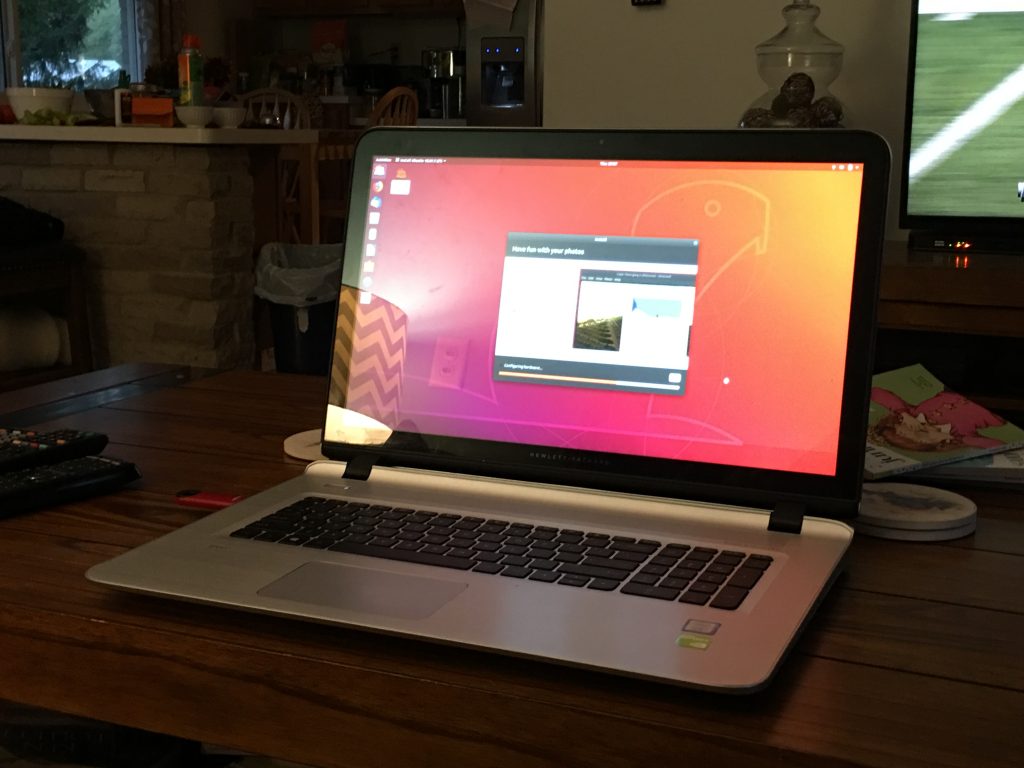
The process was essentially the same as the above linked post, so I won’t go into detail again here.  Instead, I’ll just share this picture, and again vouch for Ubuntu with yet another successful experience:

If Windows 10 has made you pine for an adult operating system, and Apple isn’t your cup of tea, then consider the latest Linux distros.  They’re far more user-friendly than they used to be.

–Simon

Ring 2

Not the “Ring 2”–I mean part deux of the Ring products saga

A year ago we got the Ring doorbell.

Thankfully, it hasn’t been instrumental in solving any crime, but it definitely brings peace of mind.  And, it’s very convenient to see who’s walking up to the door while I’m in the basement working.

But paranoia has no terminus, and I found myself eyeing Ring’s line of cameras for the back door for the same reason: I want to see if anyone’s walking up to it.  Not that anyone has, but I often leave the dog in the back to run while I work, and with reports of dog-snatchers, I wanted to keep an eye on things.  I decided upon the Stickup cam wired.

My reasoning was thus:

  • I don’t want a floodlight back there, so no-go on that model
  • I wanted wired, as I always prefer to run dedicated lines to unreliable WiFi
  • It supports PoE, which would not only allow a single cable run, but the PoE injector could then be plugged into my UPS, thus keeping the camera online in the event of a power outage

The only thing left to do then, was actually run the cable.

But the drawback of cable is that it limits placement of jacks, due to the simple matter of me not being able to squeeze into tiny places (unlike my father, I don’t have a son to task with those jobs).  I had wanted to run the cable to the attic and down the eaves and into the middle of the deck, but as I attempted to do so it became very clear that if I actually managed to drop down through the attic and into the eave space, Liz would have had to call the fire department to chop me out.

So I would have to drill through the outer wall–which was brick, so no easy feat.  But there is a pointlessly-placed back window into the garage, with a wooden frame.

The wood posed little challenge, and in short order I had a 3/8 in hole from the garage to the back yard.

From there, I ran a patch cable connecting the camera to an electrical box I installed on the garage ceiling, which housed the cable termination and ethernet jack.
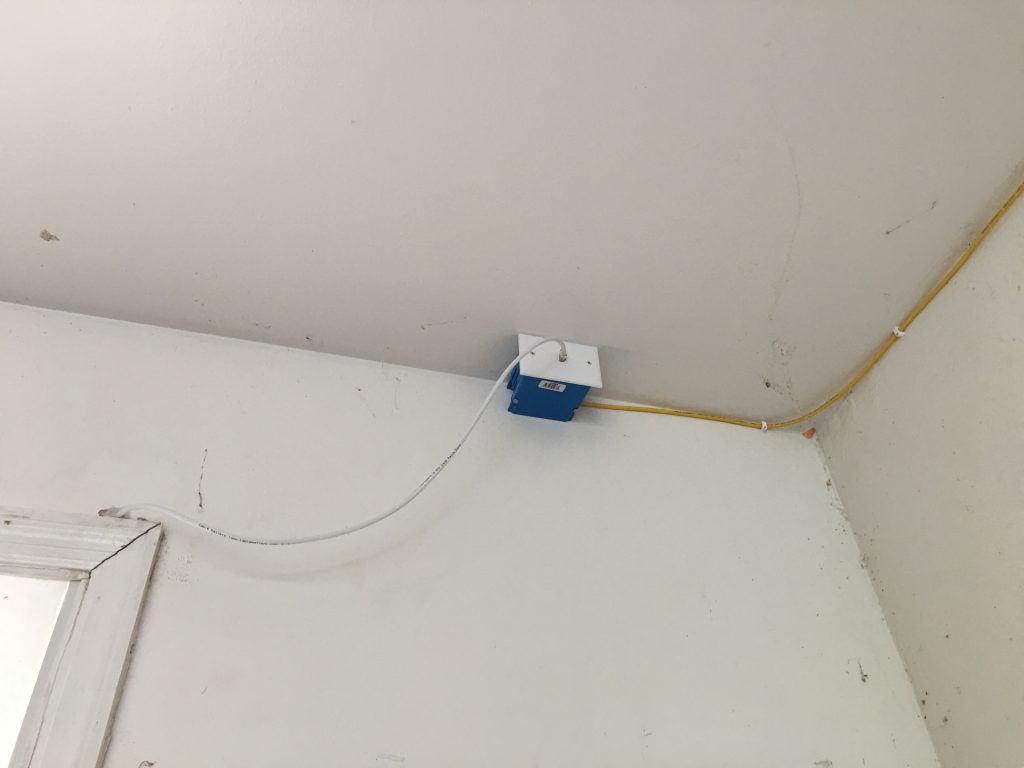
From there, the cable ran into the attic and followed the path of a prior cable install for the garage hotspot, ultimately terminating in the patch panel.  Then it was through the aforementioned PoE injector, then to the switch.

Voila: my longest cable run yet.

Now for some thoughts on PoE:

I noted that after all was up and running, the switch indicated that the connection was not gigabit.  All the equipment was rated for it, including the injector, but the amber light stubbornly refused to turn green.  Concerned that one of my punchdowns was bad (as was the case in a recent project–totally not my fault), I disconnected the injector and tested the line with a laptop.  All connections were confirmed gigabit, so I researched how PoE operates.

Surprisingly, I couldn’t find any bandwidth figures for the various specs, maybe because PoE isn’t in itself a form of data transfer, but rather a means of transmitting power over a data cable.  Still, the lack of discussion on the matter was not encouraging.  I concluded that what was happening is that I had one of the specs that sacrificed two of the 8 CAT6 wires for power, thus dropping the connection speed to Fast ethernet.  Apparently, therein lies the PoE tradeoff.

But the speed seems adequate, and while live view appears somewhat grainy, the recordings are perfectly clear.

I’m still pleased to say it hasn’t recorded any crime either.  And, apart from some rabbit-chasing videos, it’s dutifully served its primary function–notifying me when there’s backyard movement I should know about.

Recommended.

–Simon

Who Shot the Serif?

Okay I admit, I didn’t make that joke up.  But I like it so I’ll “repost” it.

My recent post on cursive got me thinking about text again.  In it, I briefly mentioned the common knowledge that sans-serif fonts were supposedly easier to read on a digital medium, whereas serif fonts were better in their printed form.  Of course, the CSS class I had taken once also touted an ideal single-line character limit as the easiest to read.  I was skeptical at the time, and talked about how to override the default WordPress line limit.  Now, staring at what I consider to be a juvenile-looking default sans-serif font, I decided that needed changing too.  In short–the Internet is wrong and I have to take matters into my own hands.

And so, you might have noticed that the fonts on this site are different now.  After some trial and error, I decided upon “Freight Text”, based on nothing more than the fact that I found it the most visually pleasing.

I have no idea who develops fonts and what’s involved with the process of their standardization.  That’s a topic for another day’s adventure through the interwebs.  But I found this brief description:

“About Freight Text

Phil’s Fonts evolved from one of the most well known and respected photolettering studios in the industry – Phil’s Photo. We carry on the traditions and standards established by its founders. As the state of typography changes in the digital era, Phil’s Fonts continues its love affair with beautiful faces, making fine typography available to artists and communicators around the world.”

Apparently there’s some studio that makes these and people decide whether or not to adopt them?  Whatever

Regardless, if you don’t have the font installed, your browser will revert to its default serif font:

    {
font-family: “Freight Text”, serif;
color: #000000;
}

And that’s it, really.  I changed the CSS for a number of elements.  Sure, fonts might be a pointless argument, but in this specific instance, I’d rather choose a more sophisticated-looking variant over its overly-simplified modern counterpart.

–Simon

Unnecessary Improvements

When we bought this house, I installed ethernet.

Then I began working at home, and discussed my basement setup.

Then I upgraded my basement setup.

Then I installed a patch panel.

Then I upgraded my basement setup again.

But still–something nagged at me.  My Linux machine demanded more respect.  It was connected to the intranet via a crimped CAT6, but that connection was merely a hack.  The wire was solid core, and not intended to be crimped to an RJ-45.  It needed improvement, and that improvement would ordinarily be very low-priority, were it not February.  But then Liz took the kid out shopping for summer clothes, and I found myself suddenly free of time.  I decided it was as good an excuse as any.

I concluded that I would wire the desk itself and install two CAT6 jacks into the middle of the second section, next to the Linux machine, and attach the cables to the underside via a cable organizer.  The desk, being of IKEA construction, was a laminated particle board and surprisingly tough.  I considered the daunting task of drilling out a rectangle for a low-voltage box, but that hardly seemed necessary.  There wouldn’t be any need to shield the wires since they wouldn’t be exposed in dead space, and if I drilled the plate down directly into the wood, there wouldn’t be any advantage to the box’s drywall tension wings.  Plus, selective drilling would minimize undermining the desk’s structural integrity.  I would just need two holes, just large enough to accommodate CAT6 keystone jacks, which I would then push up through the desk, snap into the plate, then mount the plate.  I had a plan–it was off to the hardware store (Home Depot)!

Initially, I planned to wire both desks, so I purchased 2 2x white keystone plates, 4 white CAT6 keystone punchdown jacks, 2 5ft cable organizers plus elbow, and a small bag of wood screws.  Side note: keystone jacks and cable organizers are kind of expensive.  The total price came to about $60.

Back home, I measured and placed the plate to my liking, then traced its shape.

Then I started drilling.  In hindsight, I should have started with a 1/2″ bit and made the initial holes just deep enough for the jacks, then finished the cable drops with a 3/8″,  but at the time I just continually widened the holes with the 3/8″–a minor end result, but using the 1/2″ would have looked cleaner.

Then I measured off some bulk CAT6, punched the two into the patch panel, then fed the cables up through the two drops, punched those ends down into the jacks, connected the new patch panel drops to the switch via CAT6 patch cables, then tested the new connections by plugging in the laptop.  And everything worked perfect and life was grand.

Kidding.  Neither line registered any signal.

To be clear, I’m no rookie at this.  I stared, confused, at my failed handiwork, and let the universe know my displeasure with a manly battle shout of despair towards the heavens.  Then I contemplated the sources of failure.

The cable itself should be good, as I had already used 500ft of it.  The patch cables so far hadn’t been a problem, but I tried swapping them out anyway to no avail.  The patch panel should be okay, as the first 5 lines punched down just fine.  I then tried a different computer, but still no connection.

My theory, then, was the most untested variable: the keystone jacks.  So I ripped them off and tried a new one.  Same problem.  It was irritating, seeing as they cost $5 each.  So I repackaged them and headed back to the store.

At the return desk, I mentioned that they might have a bad batch of these.  The lady didn’t acknowledge me, and simply refunded my purchase.  I have no doubt that those same jacks ended up right back on the wall, and some other home renovator would soon also be wasting 2 hours trying to figure out a bad ethernet drop.  Sigh.

For the record, they were this brand (Commercial Electric):

I’ve bought this kind before, so I dunno why I got so many that were bad this time around.

I initially had gone to Home Depot because they cater a little more to home repair, rather than improvement, and as such they carry more contractor-grade inventory.  When I was forced to try Lowe’s, I only found bags of jacks, and since I didn’t need a whole bag, I had to pay for more than I wanted–$10 more in fact.  The bill was up to $70 now.

CAT6 isn’t 2X the speed of CAT5e–it’s “potentially” 10X.

This was especially irritating since I only chose the color white to better match the minimalist theme of the basement setup, but everyplace else in the house used almond.  Maybe I would install a proper jack in the garage ceiling next (it currently has an RJ-45 crimped on the end, feeding the hotspot.  That would be another place to use white.

But anyway, I was antsy to get this project done, so I simply grumbled at the price, took them home, attached one, and it worked instantly.  Same deal with the second.  So I guess no more Commercial Electric for me.

After that, it was a simple matter of snapping in the jacks, bolting down the plate, sticking up the cable organizers and popping in the cable.  Here’s some photos of the final result:

Few things are more satisfying than a bundle of well-organized highspeed data cables.

–Simon